
Blog
AI translated #woocommerce Products DO index in Google. #seo #ai #wordpress #ecommerce #chatgpt
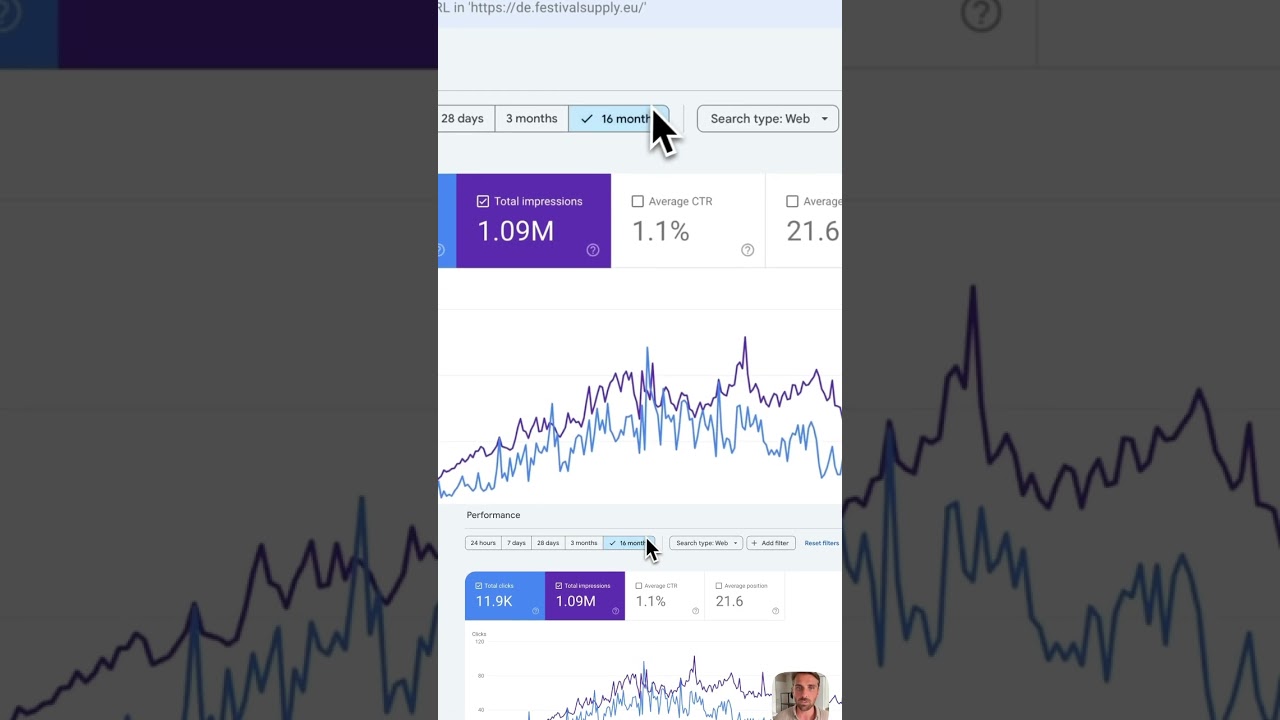
The digital marketplace is more competitive than ever. For store owners using WooCommerce, a common and pressing question often arises: "If I use AI to help translate my product listings, will those pages still be indexed and ranked by Google?" The concern is understandable. You’re investing time and resources into expanding your reach, and the last thing you want is for search engines to ignore your multilingual content.
The direct and reassuring answer is a resounding yes. Google does index AI-translated WooCommerce products, provided they are implemented correctly and meet certain quality thresholds. The era of search engines automatically penalizing content for being machine-translated is largely over. Today, the focus has shifted dramatically from how content is created to what value it provides to the user.
This article will demystify the process, outline best practices, and provide a clear roadmap for leveraging AI translation to grow your global ecommerce presence without sacrificing your hard-earned search engine visibility.
Understanding Google’s Evolving Perspective on AI-Generated Content
For years, webmasters operated under a cloud of fear regarding automated content. Google’s webmaster guidelines previously warned against auto-generated content, which often included clunky, literal machine translations. This led to a widespread misconception that all AI-assisted content was inherently risky for SEO.
However, Google’s official stance has evolved significantly. The company now emphasizes rewarding "helpful, reliable, people-first content." Their focus is on quality and user intent, not the specific tool used to create it. As stated by Google’s Search Liaison, Danny Sullivan, "What matters is whether the content is helpful and reliable, not how it was produced."
This paradigm shift means that high-quality AI translation, which effectively serves a searcher in their native language, is not only indexable but can be a powerful asset. The key differentiator is no longer human vs. machine, but rather high-quality vs. low-quality.
Best Practices for SEO-Friendly AI Translation in WooCommerce
Simply running your product descriptions through a free, basic translation tool and publishing the results is a recipe for poor user experience and missed opportunities. To ensure your translated products are indexed and actually attract valuable traffic, follow these essential strategies.
1. Prioritize Human Oversight and Editing
Think of AI as a incredibly efficient and knowledgeable first draft writer, not a finished copywriter. The raw output from any AI model, including advanced tools like ChatGPT, Claude, or dedicated translation software, requires human refinement.
- Review for Cultural Nuance: A direct translation might be technically correct but culturally inappropriate or awkward. An idiomatic phrase in English might not translate well. A human should review the text to ensure it resonates with the local audience.
- Check for Technical Accuracy: Ensure product specifications, sizes, measurements (converted correctly!), and technical terms are translated accurately. An error here can lead to returns and damaged trust.
- Inject Brand Voice: AI can sometimes produce generic text. Edit the translation to incorporate your brand’s unique tone and personality, ensuring consistency across all languages.
2. Implement a Solid Technical SEO Foundation
Google must be able to find, crawl, and understand the structure of your multilingual site. Technical setup is non-negotiable.
- Use hreflang Tags: This is the most critical technical element. Hreflang tags are HTML attributes that tell Google the relationship between pages in different languages. For example, they indicate that the German version of a product page (
example.com/de/product/) is intended for users in Germany, while the French version (example.com/fr/product/) is for users in France. This prevents duplicate content issues and ensures the correct version appears in the right search results. - Choose a Clear URL Structure: Make it obvious from the URL what language a page is in. Common methods are using subdirectories (
yoursite.com/de/), subdomains (de.yoursite.com), or country-code top-level domains (yoursite.de). Subdirectories are often the easiest to manage for SEO within WooCommerce. - XML Sitemaps: Include all translated versions of your pages in your XML sitemap and submit it to Google Search Console. This provides a clear roadmap for search engines to discover your content.
3. Focus on Localized Keyword Research
Translating your existing keywords directly is a common but flawed approach. Search habits differ by region.
- Go Beyond Direct Translation: Use keyword research tools like SEMrush or Ahrefs set to the specific country you are targeting. Discover what terms and phrases people in that locale actually use to search for products like yours.
- Incorporate Localized Terms: Integrate these naturally discovered keywords into your translated product titles, meta descriptions, and body content. This moves your translation from merely "correct" to truly "relevant" for local search queries.
4. Optimize All On-Page Elements
Translation shouldn’t stop at the visible product description. Every element that communicates with search engines needs attention.
- Page Titles and Meta Descriptions: These are crucial for click-through rates in search results. Translate and optimize them with local keywords.
- Image ALT Text: Any image on your product page, especially the main product image, should have its ALT text translated. This improves accessibility and provides another SEO signal.
- Schema Markup: If you use structured data (like Product schema), ensure the information within it (price, availability, etc.) is accurately translated and reflects the local currency and language.
5. Ensure a Flawless User Experience (UX)
Google’s algorithms are increasingly sophisticated at measuring user satisfaction. Your translated page must provide a great experience.
- Localized Currency and Payments: Display prices in the local currency and offer payment methods that are popular and trusted in that region.
- Translated Checkout and Cart: The entire purchasing journey, not just the product page, must be translated. An English checkout process after a French product description will create friction and abandonments.
- Mobile Responsiveness: Ensure your translated site is just as fast and responsive on mobile devices as your primary site.
A Practical Workflow for Translating WooCommerce Products with AI
Here is a step-by-step process you can implement:
- Select Your Tool: Choose a reliable AI translation tool. Options range from ChatGPT (using prompts like "Translate the following product description into [language] for an ecommerce audience, keeping it persuasive and natural…") to specialized plugins like Weglot or ConveyThis that integrate directly with WooCommerce.
- Translate the Core Content: Run your product title, description, and short description through the AI.
- Human Edit and Enhance: Have a native speaker or a professional editing service review the output. Check for flow, cultural accuracy, and keyword inclusion.
- Technical Implementation: Use your chosen method (plugin or developer) to implement the translated content on your site with the correct hreflang tags and URL structure.
- Optimize On-Page SEO: Manually translate and input the meta titles, descriptions, image ALT text, and any structured data.
- Monitor in Google Search Console: Use the Performance report to track indexing status and search queries for your translated pages. Look for impressions and clicks to see if your visibility is growing in the new market.
Conclusion: Quality and Intent Are King
The question is no longer if Google will index your AI-translated WooCommerce products, but how well they will rank. By moving beyond simple word-for-word translation and embracing a strategy built on human-edited quality, technical precision, and genuine localization, you can confidently use AI as a force multiplier.
This approach allows you to break into new markets efficiently, provide a valuable service to international customers, and build a truly global ecommerce presence—all with the full support of modern search engine algorithms. The tools are powerful and available; success now hinges on your strategy and attention to detail.
