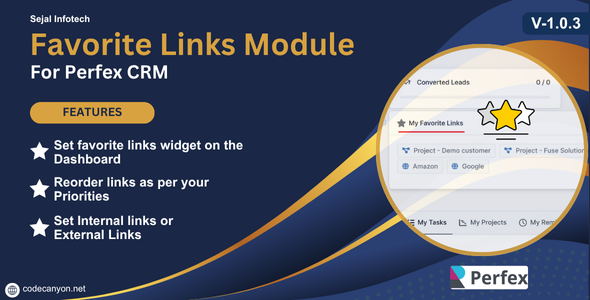
Favorite Links Module for Perfex CRM
In today’s fast-paced business environment, having quick access to essential tools and resources can significantly enhance productivity. One feature that stands out in Perfex CRM is the Favorite Links Module. This module allows users to bookmark important links, making navigation more efficient and improving overall workflow. Whether you’re a new or seasoned user, understanding how to leverage this feature can transform your experience with Perfex CRM.
What is the Favorite Links Module?
The Favorite Links Module is a handy feature within Perfex CRM that enables users to create a personalized list of links they frequently access. This could include direct links to client profiles, project management tools, internal documentation, or even external resources that enhance daily tasks. By centralizing these links in one accessible location, users can save precious time and streamline their processes.
Why Use the Favorite Links Module?
The advantages of using the Favorite Links Module are numerous. Here are a few compelling reasons to consider integrating this feature into your daily routine:
1. Time Efficiency: Instead of sifting through multiple menus to find commonly used tools or resources, you can simply click your favorite links. This can dramatically reduce the time spent on repetitive tasks, allowing for a more efficient workday.
2. Organization: The module helps maintain a tidy workspace. By having your favorite links stored in a dedicated section, you avoid clutter on your main menu and keep your environment organized.
3. Customization: Each user can tailor their list according to personal preferences and needs. This level of customization ensures that you only see what’s relevant to you, enhancing your user experience.
4. Enhanced Collaboration: If your team members share favorite links, it fosters better collaboration. Everyone can quickly access the same resources, ensuring that everyone is on the same page and streamlining communication.
How to Set Up the Favorite Links Module
Setting up the Favorite Links Module in Perfex CRM is a straightforward process. Follow these steps to get started:
1. Access the Module: Begin by logging into your Perfex CRM account. Navigate to the main dashboard and look for the Favorite Links option in the menu.
2. Add Links: Click on the Add Link button. This will prompt you to input the URL and a brief description of the link. Choose a name that clearly indicates what the link is for, making it easy for you and your team to remember.
3. Organize Your Favorites: You can rearrange the order of your links to prioritize the ones you use most often. Simply drag and drop them into the desired position.
4. Save Changes: Once you’ve added all your desired links, don’t forget to save your changes! Your favorite links will now be readily accessible whenever you log into your Perfex CRM account.
Tips for Maximizing the Favorite Links Module
To make the most out of the Favorite Links Module, consider the following tips:
– Regular Updates: As your projects and needs evolve, revisit your list of favorite links to ensure it remains relevant. Remove links you no longer use and add new ones that could enhance productivity.
– Collaborate with Your Team: Encourage team members to share their favorite links. This can provide new insights into resources or tools that you might not have considered.
– Use Descriptive Names: When adding links, use names that clearly articulate the content of the link. This will save time searching for specific resources.
Conclusion
The Favorite Links Module for Perfex CRM is more than just a simple feature; it’s a powerful tool that can significantly enhance your work efficiency, organization, and team collaboration. By taking the time to set it up and customize it to your needs, you’ll enjoy a smoother workflow and potentially even increase your productivity. Whether you’re managing projects, connecting with clients, or researching new strategies, this module will keep all vital resources just a click away. Embrace the power of the Favorite Links Module and watch your efficiency soar!
Browse more in PHP Scripts, including Ready eCommerce – Complete Multi Vendor eCommerce Mobile App, Customer Website with Store POS. Official source: PHP official site.





Reviews
Clear filtersThere are no reviews yet.