
Blog
PHP Scripts Marketplace: How to Choose and Buy Safely

A good PHP scripts marketplace sells code that is officially licensed, shows which PHP version it was tested on, and gives you someone to ask when the install fails. Price comes after those three. If you are a developer, freelancer or agency in Bangladesh buying a classifieds site, a store or a directory for a client, the cheapest download is rarely the cheapest project.
This guide shows what to check before you pay, what scripts typically cost, how to test one before launch, and where Theme Bazar BD fits.
TL;DR
- Buy only scripts with an official licence. Unlicensed copies carry no updates, no support and no safe way to fix problems.
- Prices vary widely by marketplace and licence tier. One independent roundup found examples from about $4 to several thousand dollars, before installation, hosting and customisation.
- Ask for the exact PHP branch the script was tested on. PHP 8.2 is security-only until 31 December 2026, so a script that stops there is already near the end.
- Install on staging first and run a repeatable security checklist before any client data goes in.
- Check that the script can work with the payment methods your customers actually use in Bangladesh.
Table of Contents
- What a PHP scripts marketplace actually sells
- Seven checks before you buy any script
- What PHP scripts cost
- Why free and nulled scripts cost more
- Test the script on staging before launch
- Bangladesh specifics: payments, hosting and clients
- Our perspective at Theme Bazar BD
- Where Theme Bazar BD fits
- A short buying routine you can reuse
- FAQ
- Sources
What a PHP scripts marketplace actually sells
A PHP script is a ready-made web application: a classified ads portal, a multi-vendor store, a job board, a booking system, a social listing site. You upload it to a server, connect a database, configure it and brand it. You skip months of development, and you inherit someone else’s code.
That last point is the whole buying decision. A marketplace is not just a download shelf. It is a promise about who wrote the code, whether you may legally run it, and what happens when something breaks.
The main types of place to buy are:
- Large open marketplaces with thousands of items from independent authors. Choice is huge and quality is uneven, so you read reviews, sales counts and update dates carefully.
- Single-vendor script shops that sell their own products. Quality is more consistent, but the catalogue is narrow.
- Resellers of licensed products, where one store carries many official products in organised categories and handles purchase and support questions in one place. This is the model we use.
- Free and “nulled” download sites. Not a marketplace in any useful sense. More on that below.
Seven checks before you buy any script
1. Is the licence official?
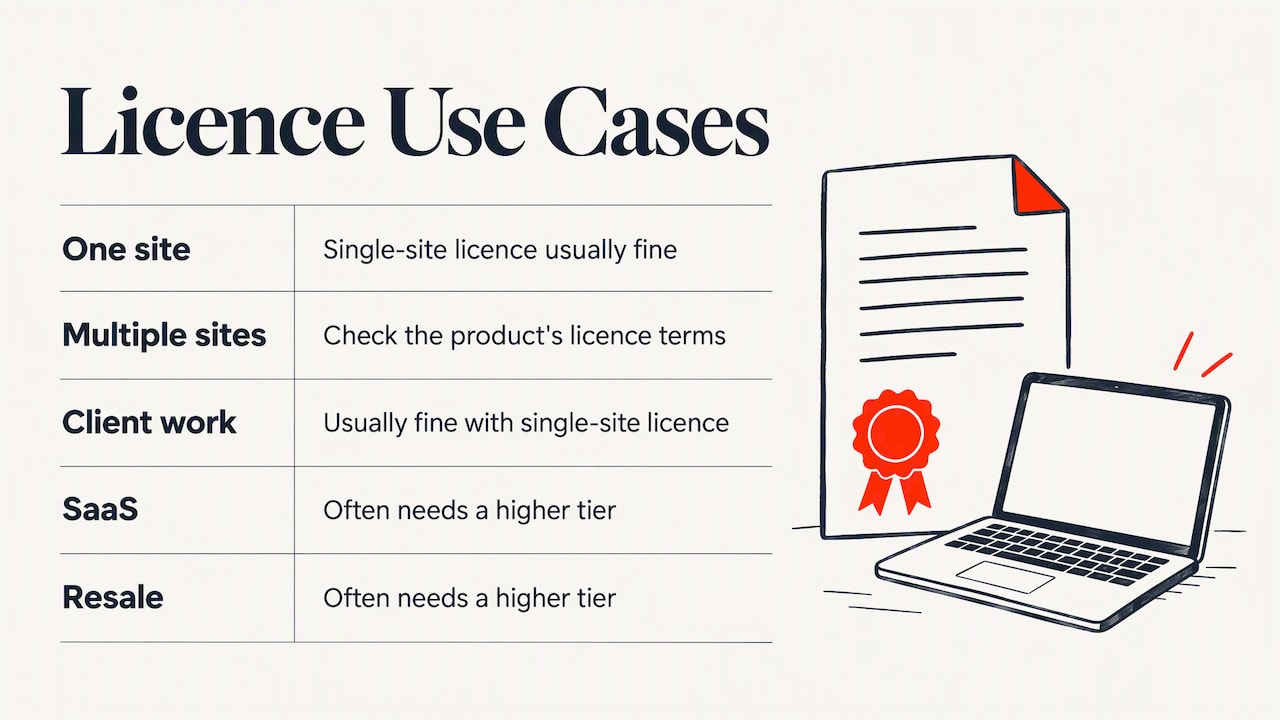
A licence tells you what you may do: use it on one site or many, build it for a client, resell it. Read the licence terms for the product you are buying, because tiers differ. A single-site licence is usually fine for one client project, while a SaaS or resale use often needs a higher tier. Ask the seller before purchase if the terms are unclear.
An official licence is also what entitles you to updates from the author. Without it, you have a copy of the code frozen on the day someone took it.
2. Which PHP version was it tested on?
“PHP 8 compatible” is too vague. PHP’s own policy gives each branch two years of active support, then two years of critical-security-only fixes, after which it reaches end of life. As of 18 October 2026, the official table gives this picture:
| PHP branch | Active support until | Security fixes until |
|---|---|---|
| 8.2 | ended | 31 December 2026 |
| 8.3 | ended | 31 December 2027 |
| 8.4 | 31 December 2026 | 31 December 2028 |
| 8.5 | 31 December 2027 | 31 December 2029 |
For a new client project, ask which branch the script was tested on, which extensions it needs, which database version it expects, and whether the author has a record of moving to newer PHP releases. A script that only runs on an old branch will push you into an emergency migration, or leave your client on unsupported software.
3. When was it last updated, and how often?
Look at the changelog. Regular releases that mention security fixes and framework upgrades are a good sign. A product untouched for two years may still work, but you will be the one maintaining it. For freelancers, a documented upgrade path is worth more than a polished demo.
4. What framework is it built on?
Many modern scripts use Laravel or CodeIgniter, and some are plain PHP. Pick something your team can read and debug. If you cannot find a developer for the framework in your city, you have a hidden maintenance cost.
5. What does support really cover?
Support usually means help with installation problems and bugs in the script. It rarely means custom features. Find out how long support lasts, how you reach it and whether it comes from the author or the seller. We cover this under post-purchase support at Theme Bazar BD, and you should ask any seller the same question before paying.
6. Is there documentation you can follow?
Open the documentation before buying. Look for installation steps, server requirements, a configuration guide and a section on updating. Thin documentation means more support tickets later.
7. Can you try it before you commit?
A live demo shows the interface and the main flows. It does not show the code quality or the security of the system. Treat it as a first filter only, then do the staging test described below.
What PHP scripts cost
Prices depend heavily on the type of script, the licence tier and the marketplace. A September 2025 independent roundup reported one script library with prices from $4.29 to $129, a large open marketplace from $6 up to several thousand dollars, and another from $4 to $650. The same article gave examples of a food-delivery script at $79 or $129 depending on licence, an appointment scheduler at $69 or $122, and a simple CMS at $19 or $29.
Treat those as examples, not as a price list for today. What matters for your budget is everything around the licence fee:
- Installation and server setup
- Customisation and branding
- Hosting suited to the app
- Payment gateway work
- Ongoing maintenance and updates
A $30 script that needs 40 hours of your time is not a $30 project. When you quote a client, price the script, the integration work and a maintenance plan as separate lines.
Why free and nulled scripts cost more
A nulled script is a paid product with its licence check removed and redistributed for free. The saving looks attractive, particularly on a tight budget. The risks are practical:
- You cannot know what else was added to the code. A modified file can contain a backdoor, and you would not see it in the demo.
- You get no updates from the author, so every future vulnerability stays open.
- You get no support, and you have no legal footing if the client asks where the software came from.
- If you are an agency, your name is on the site that gets compromised.
An official licence costs money once. A hacked client site costs your reputation. That is the plain business case for buying licensed software, and it is why every product we list is sold with an official licence.
Test the script on staging before launch
A demo is not a security review. Before a script touches client data, install it on a staging server and run a structured check. OWASP’s web application checklist describes a methodical workflow, and it can be adapted into an acceptance checklist for your agency. It also states plainly that it lists issues to test and does not prescribe techniques, so you choose the tools.
A practical version:
- Inventory. Write down the script version, PHP branch, extensions, database, web server and every third-party service it calls.
- Test the server first. A weakness at server level can give an attacker leverage over the application, so check configuration, open ports and file permissions before the code.
- Test the application. Cover login and password reset, roles and permissions (can a normal user reach an admin page?), sessions, input validation, file uploads, error messages and any payment-related flow.
- Try to confirm each finding. A scanner warning is not a vulnerability until you can show it matters in your setup.
- Fix and retest. Reassess after every change, and keep the record for the client.
OWASP also warns that penetration testing alone does not find every operational, technical or management weakness. Add backups, update routines and access control for staff accounts to your handover document.
If you maintain the project yourself, a dependency audit is worth adding to the routine for Composer-based scripts. A SecureCoding guide on PHP security resources recommends running composer audit as a check you can do this week.
Bangladesh specifics: payments, hosting and clients
The script’s feature list matters less than whether it fits how your customers pay. In Bangladesh that usually means local gateways and mobile wallets rather than only card checkout. Before buying an e-commerce, marketplace or classifieds script, check:
- Payment gateway support. Does the script already include the gateway you need, or will you write an integration? Some Bangladeshi gateways publish developer libraries. For example, SSLCommerz offers a raw PHP library on GitHub, which shows what a custom integration involves. Budget the hours.
- Currency and language. Can the script show BDT and handle Bangla text and fonts cleanly?
- Hosting. Choose a host that offers the PHP branch you need and lets you run cron jobs, since many scripts depend on them.
- Invoicing. Ask whether the client needs local-format invoices, and if the script can produce them.
If you are comparing options between a WordPress build and a PHP script, our guide to WordPress alternatives can help you decide which route fits the project. A directory, classifieds or social listing site often suits a dedicated script better than a plugin stack.
Our perspective at Theme Bazar BD
Most of the support problems we see come from the same three places: a script bought without checking the PHP version, a licence that did not match the use, and a site launched without a staging test. None of those are about code quality. They are about buying habits.
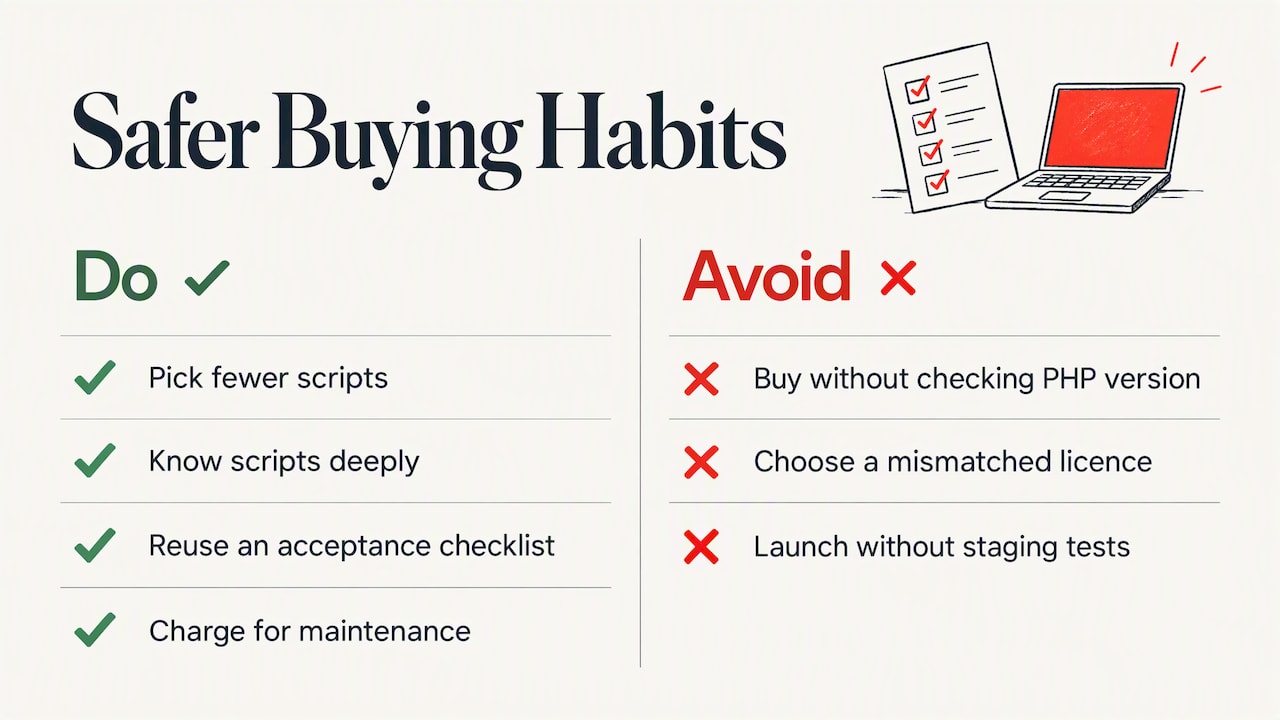
So we sell official licences only, and we organise the catalogue by type so you can compare scripts against the same criteria instead of scrolling through an unsorted list. Our refund policy is no-questions-asked, because we would rather you buy with confidence than guess from a demo. And we keep support after purchase, since a script is only as useful as your ability to get it running.
Our advice to freelancers and small agencies is simple: pick fewer scripts and know them deeply. A team that has installed, hardened and updated the same classifieds script five times delivers faster and safer than one that tries a new product for every client. Keep a short acceptance checklist, reuse it, and charge for maintenance.
— Resellerhostar
Where Theme Bazar BD fits
If you want an official licence and support from one place, start with the PHP scripts category on Theme Bazar BD. Two examples of what you will find:
- Classify, a classified ads PHP script with an official licence, for building a local listings portal.
- Bazaar, a web PHP social listings script with an official licence, for community-style listings.
If you need an online shop rather than a listings site, see Bajaar, an official licence for your online store.
If you would rather have the site built than install it yourself, our website packages are listed with one-off prices: a Blogging, Portfolio or Company Website is $35 each, a Newspaper Website is $50, an E-Commerce Website is $100 and an Educational Website is $150.
A short buying routine you can reuse
Put the steps together and you have a repeatable process:
- Define the project in one paragraph: who uses it, how they pay, how many users you expect.
- Shortlist two or three scripts that match, and read their licence terms.
- Check the PHP branch, last update date and documentation.
- Ask the seller about support length and refund terms before paying.
- Buy the correct licence tier for your use.
- Install on staging, run the checklist, record the results.
- Configure payments and test a real small transaction.
- Launch, then schedule updates and backups.
It takes a day or two longer than clicking download on the first demo. It saves you the week you would spend repairing a launch.
FAQ
Where can I buy PHP scripts safely in Bangladesh?
Buy from a seller that provides official licences, shows a changelog and offers support after purchase. At Theme Bazar BD every product is sold with an official licence, and you can browse PHP scripts by category on our homepage. Avoid sites that offer paid scripts for free, because the code may have been altered.
What should I look for in the best PHP script marketplaces?
Look for clear licence tiers, documented PHP version support, recent updates, usable documentation and a support route you can actually reach. Reviews help, but they mostly describe the demo experience. Your own staging test tells you much more about the code.
How much does a PHP script cost?
It depends on the script and the licence. An independent 2025 roundup found examples from about $4 up to several thousand dollars across different marketplaces, with higher prices for extended licences. Add the cost of installation, hosting, payment integration and maintenance when you budget for a client.
Which PHP version should my script support in 2026?
Aim for a script tested on a branch with a long security runway. According to the official PHP support table, PHP 8.4 has security support until 31 December 2028 and PHP 8.5 until 31 December 2029. PHP 8.2 gets security fixes only until 31 December 2026, so avoid starting a new project that depends on it.
Sources
- PHP: Supported Versions
- OWASP Web Application Penetration Checklist
- The 6 Best Sites to Buy PHP Scripts Online (2025)
- PHP security resources: php.net, OWASP ini, composer audit
- SSLCommerz PHP library on GitHub
