
Blog
How to Make Free Website with Free Hosting & Free Domain | Blogging Full Course in Hindi 2025
Creating a Free Website with Free Hosting and Domain: A Step-by-Step Guide
Building a website doesn’t have to be expensive or complicated. With the right tools and guidance, you can create a professional-looking site for free. This guide will walk you through the steps needed to make a website with free hosting and a free domain.
Why Create a Website?
Establishing an online presence is vital in today’s digital age. Whether you want to showcase your portfolio, blog about your passions, or start an online store, having a website allows you to reach a wider audience. Plus, it’s an excellent way to express your creativity.
Understanding the Basics
Before diving into the creation process, it’s important to understand some key terms:
- Domain Name: This is your website’s address on the internet (e.g., www.yourwebsite.com). A free domain typically includes the service provider’s name (e.g., www.yourwebsite.provider.com).
- Web Hosting: This is where your website’s files are stored. Free hosting services will allow your website to be accessible online without any cost.
Step 1: Choose a Free Website Builder
A website builder simplifies the process of creating a site. Here are some popular options that offer free packages:
-
Wix: Known for its drag-and-drop interface, Wix allows you to create visually appealing sites with ease. Their free plan includes hosting and a Wix-branded domain.
-
WordPress.com: Ideal for bloggers, WordPress offers a wide range of templates. Their free plan also comes with hosting and a subdomain.
- Weebly: With an intuitive interface, Weebly is great for beginners. Their free plan provides hosting and a Weebly-branded domain.
Step 2: Sign Up for an Account
Once you’ve chosen a website builder, create an account. This process typically involves providing an email address and creating a password. Some platforms may also request additional information.
Step 3: Pick a Domain Name
When using free services, you’ll often be given the option to select a subdomain. While it may not sound as professional as a custom domain, it is a great starting point for free website creation. Aim for a name that’s short, memorable, and relevant to the content of your site.
Step 4: Choose a Template
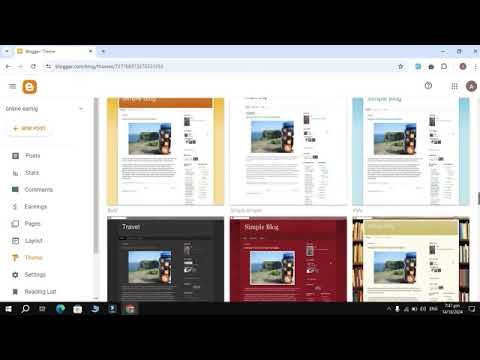
Most website builders offer a variety of templates to choose from. Select a design that aligns with your goals. For instance, if you’re starting a blog, consider a template that emphasizes readability. If you’re showcasing a portfolio, choose a template that highlights images.
Step 5: Customize Your Website
Once you’ve selected a template, it’s time to personalize your site:
-
Add Pages: Consider what pages you need—common ones include Home, About, Blog, and Contact.
-
Content Creation: Craft high-quality content that resonates with your target audience. Use headings, subheadings, and bullet points to improve readability.
- Images and Media: Incorporate images, videos, and graphics to make your site visually appealing. Ensure you have permission to use any media you incorporate.
Step 6: Optimize for SEO
Search Engine Optimization (SEO) is crucial for increasing your website’s visibility. Here are some basic SEO strategies:
-
Keywords: Identify relevant keywords that your audience is likely to search for. Integrate these keywords naturally into your content.
-
Meta Tags: Use meta titles and descriptions for your pages. These tags provide search engines with information about your site’s content.
- Alt Text for Images: Add alt text descriptions to your images. This not only improves accessibility but also provides search engines with context about your visuals.
Step 7: Preview and Test
Before making your website live, take the time to preview it. Check for the following:
-
Responsive Design: Ensure that your website looks good on various devices, including phones and tablets.
-
Links: Test all internal and external links to ensure they work correctly.
- Load Time: A slow-loading website can deter visitors. Optimize images and minimize third-party scripts to enhance load speed.
Step 8: Publish Your Website
Once you’re satisfied with your site, hit the publish button! Your website is now live for the world to see. Share your creation with friends and family, and encourage them to provide feedback.
Step 9: Promote Your Website
Creating your website is just the beginning. To attract visitors, consider these promotional strategies:
-
Social Media: Share your content on social media platforms to reach a broader audience.
-
Networking: Connect with other bloggers and website owners in your niche. Collaborations can lead to increased visibility for both parties.
- Email Marketing: Collect email addresses and send newsletters with updates and new content. This helps keep your audience engaged.
Step 10: Continuously Update and Improve
A successful website requires ongoing maintenance and updates. Regularly publish new content, respond to comments, and analyze your site’s performance using tools like Google Analytics. Use this data to make informed decisions about your content strategy.
Conclusion
Creating a free website with free hosting and a domain is an achievable goal with the right approach. Follow these steps to build your online presence and share your passions or business endeavors with the world. Remember, the key to a successful website lies in continuous improvement and staying up-to-date with industry trends. Embrace the journey of creating and maintaining your site, and watch your online presence grow.
By taking these steps, you’ll not only learn valuable skills but also open doors to new opportunities in the digital world. Start your journey today!
