Harnessing AI with WordPress Page Generator Pro for Location Keywords
In the digital age, optimizing your website for search engines has become a critical component of business success. Effective SEO strategies hinge on a variety of tactics, and one of the most powerful tools available for enhancing your site’s visibility is WordPress Page Generator Pro. This innovative software not only streamlines the content creation process but also leverages artificial intelligence to help you seamlessly incorporate location-based keywords into your pages.
Understanding the Importance of Location Keywords
Location keywords are essential for businesses that target specific geographical areas. Whether you’re a local restaurant, service provider, or an e-commerce store aiming to attract regional customers, these keywords help you reach your desired audience more effectively. By integrating location-specific phrases, you can:
- Improve local search visibility
- Attract traffic from potential customers in your target area
- Enhance the relevance of your content for users searching for local services
When used correctly, location keywords can significantly boost your rankings on search engine results pages (SERPs), enabling you to stand out among the competition.
The Role of WordPress Page Generator Pro
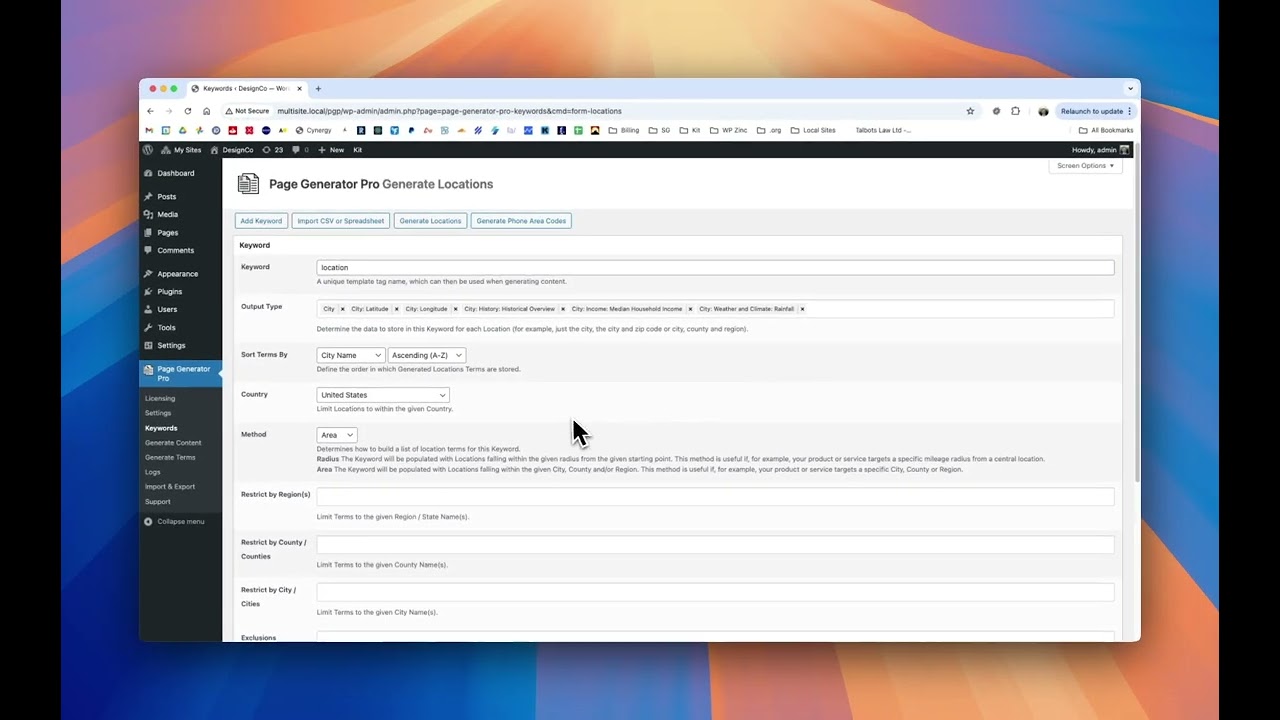
WordPress Page Generator Pro is a powerful tool designed to facilitate content generation on WordPress websites. It simplifies the process of creating bulk pages, posts, and custom content with ease. One of its standout features is its ability to integrate AI for the optimization of location keywords.
With the software’s user-friendly interface, users can quickly generate content tailored to their specific needs. Its automation capabilities streamline the cumbersome task of keyword insertion, allowing you to focus on creating quality content that engages your audience.
Setting Up WordPress Page Generator Pro
To get started with WordPress Page Generator Pro, follow these straightforward steps:
-
Install the Plugin: Begin by installing and activating the WordPress Page Generator Pro plugin on your site. The process is similar to installing any other WordPress plugin.
-
Explore the Settings: Familiarize yourself with the various settings and options available. This includes customizing templates, inserting keywords, and linking to external sources.
-
Create a New Project: Select ‘Add New Project’ to begin generating content. This feature allows you to specify details about the type of content you want to create.
-
Utilize AI for Keyword Generation: The AI tool comes into play here. By entering your main keywords and intended location, the plugin can generate relevant variations. This is where you can supercharge your SEO efforts.
- Generate Location-Specific Content: Once the keywords are set, the plugin will create pages or posts with the included keywords seamlessly integrated into the content.
Optimizing Content with AI
Utilizing AI for content generation offers several advantages, particularly when it comes to keyword optimization:
-
Dynamic Content Creation: AI can produce a wide range of content variations, which helps you cater to diverse search queries in your geographic area. This ensures that your site ranks for multiple relevant terms.
-
Relevance: AI algorithms analyze data trends. This capability means that the keywords generated are not only location-specific but also relevant to current search behaviors, increasing your chances of ranking higher in SERPs.
- Speed: Manual keyword insertion can be time-consuming. AI tools dramatically reduce this time, allowing you to create high-quality, optimized content in a fraction of the time.
Crafting Quality Content
While integrating location keywords is essential, it’s crucial to emphasize the quality of your content. Search engines prioritize user experience, meaning that well-written, informative content is likely to rank better. Here are a few tips for maintaining high content quality:
-
Focus on User Intent: Make sure your content helps users find the information they are looking for. This could be through providing details about services, unique offerings, or answering common questions related to your business and its location.
-
Incorporate Visual Elements: Use images, infographics, and videos to enhance your content. Rich media can attract more visitors and keep them engaged longer, positively affecting your bounce rate and dwell time.
-
Utilize Subheadings: Break your content into easily digestible sections with informative subheadings. This not only makes the text easier to skim but also helps with SEO.
- Update Regularly: Keep your content fresh and relevant. Regular updates signal to search engines that your site is active, improving the likelihood of higher rankings.
Tracking Performance
After implementing your location keyword strategy, it’s essential to monitor the results. This will help you understand what’s working and where you might need to make adjustments. Use tools like Google Analytics and Google Search Console to track:
-
Traffic Sources: Identify where your traffic is coming from and which keywords are performing best.
-
Bounce Rates: High bounce rates can indicate that your content isn’t meeting visitors’ expectations. Adjust your content accordingly.
- Conversion Rates: Ultimately, the goal of SEO is to drive conversions, whether that’s signups, sales, or leads. Monitor how many visitors are completing desired actions on your site.
Conclusion
Incorporating location keywords into your content strategy is vital for any business looking to enhance its online visibility. With tools like WordPress Page Generator Pro harnessing the power of AI, achieving this becomes streamlined and efficient. By focusing on quality content and continuously monitoring your results, you can create a robust SEO strategy that elevates your brand’s presence and drives more local traffic to your site.
Remember, the landscape of SEO is ever-evolving. Stay up to date with industry trends and continuously refine your strategies to maintain a competitive edge in your local market. When you align your content with user intent while utilizing the best tools available, you will see the fruits of your efforts in increased visibility and customer engagement.