
Blog
สร้าง Blog WordPress อัตโนมัติ! ด้วย n8n + AI | มือใหม่ก็ทำได้
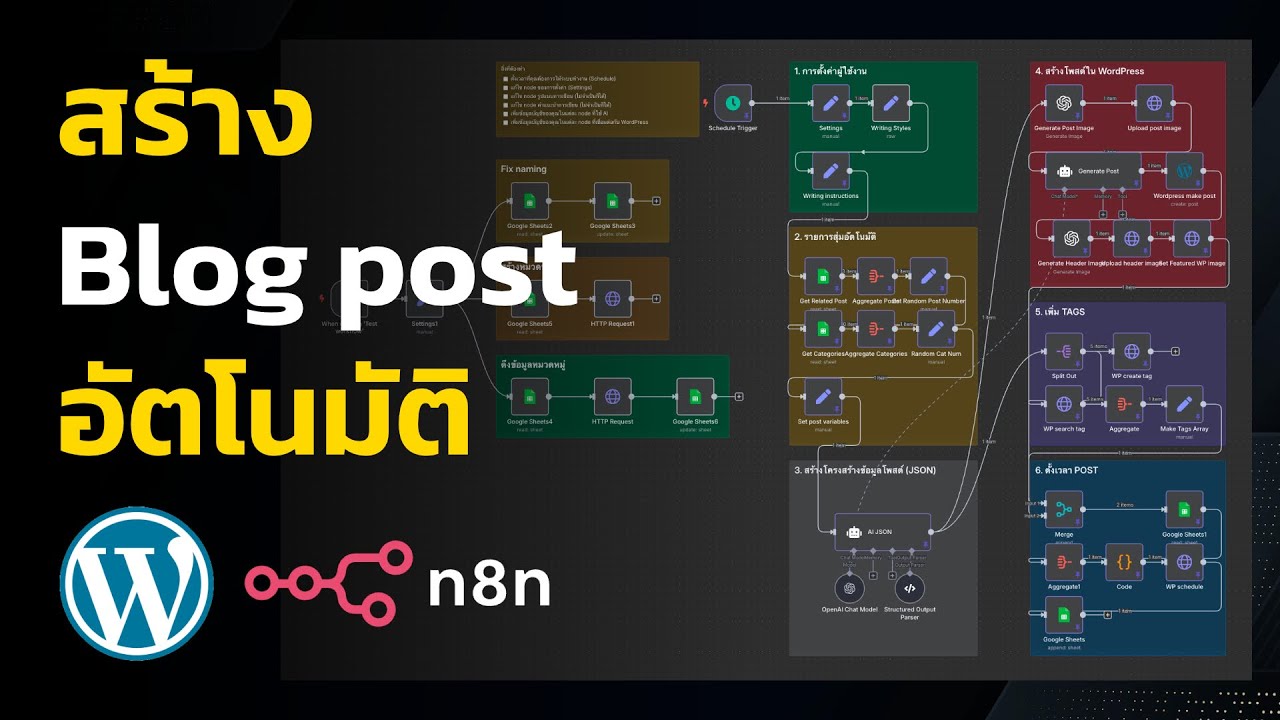
Introduction
Creating a blog has never been more accessible, especially with the advent of various automation tools and artificial intelligence. If you’re a beginner looking to establish a WordPress blog effortlessly, you can streamline the process using n8n combined with AI technologies. This guide will walk you through the steps of automating your WordPress blog setup, allowing you to focus on content creation rather than technical details.
Understanding the Basics
What is WordPress?
WordPress is the world’s most popular content management system (CMS). It enables users to create, manage, and publish a variety of content types, making it an ideal choice for bloggers, businesses, and organizations alike. With its extensive range of plugins and themes, WordPress offers unlimited customization opportunities.
What is n8n?
n8n is an open-source automation tool that enables users to connect various applications and automate workflows. Its visual interface allows you to create "nodes" for different tasks, streamlining processes without the need for deep programming knowledge.
The Role of AI in Blogging
Artificial Intelligence can greatly enhance your blogging experience. From generating content ideas to optimizing SEO, AI tools can save time and improve the quality of your posts. By integrating AI into your blogging strategy, you can enhance engagement and reach a broader audience.
Setting Up Your Environment
Choosing a Hosting Provider
Before diving into the automation, you need a reliable hosting provider for your WordPress site. Choose one that offers one-click WordPress installations, good customer support, and scalable plans. Common options include Bluehost, SiteGround, and WP Engine.
Installing WordPress
Most hosting providers have a straightforward method to install WordPress. Follow the prompts on your hosting dashboard, typically found under a section labeled "WordPress" or "Website." Here’s a simple process to get you started:
- Log in to your hosting account.
- Locate the WordPress installer.
- Fill in the required fields (site name, admin email, etc.).
- Click “Install.”
Automating WordPress with n8n
Getting Started with n8n
n8n can be self-hosted or run via their cloud version. For beginners, the cloud version is simpler:
- Sign up for an n8n account.
- After logging in, you’ll access the n8n editor, where you can create workflows.
Integrating WordPress and n8n
You’ll need to connect your WordPress site to n8n:
- In n8n, click on “New Workflow.”
- Search for the WordPress node and drag it into your workflow.
- You’ll be prompted to enter your WordPress site URL, username, and application password (generated in the WordPress admin under “Users”).
Creating Your First Workflow
Now, let’s create a simple automation workflow. This example will automate posting new blog articles generated by AI directly to your WordPress site.
- Choose an AI Content Generator: Select an AI tool that generates blog ideas or drafts (like OpenAI’s GPT-3 or other AI writers).
- Connect the AI to n8n: Use the HTTP Request node to connect to your AI tool. Configure it to request content using a prompt relevant to your niche.
- Output the AI Response: Take the response from the AI and use it in the WordPress node, setting it to create a new post.
- Add Triggers: You can set triggers like a weekly schedule or specific conditions for content generation.
Step-by-Step Example of a Workflow
Here’s how to set up a workflow from scratch:
- Trigger Node: Start with a “Schedule” node. Set it to trigger every Monday at 9 AM.
- AI Node: Connect to your chosen AI content generator using the HTTP request. Specify details like the topic or keywords you want the AI to explore.
- WordPress Node: Directly link the AI output to the WordPress action node. Choose to create a post and input the title and content fields with data from the AI response.
- Publish Settings: Decide whether to publish immediately or keep it as a draft for later review.
Testing Your Workflow
Once your workflow is in place, it’s essential to test it to ensure everything functions as expected. Click the “Execute Workflow” button to simulate the process. Review the log to see if the blog post was created without errors. Adjust nodes as necessary for better performance.
Enhancing Your Blog with Automation
Automating SEO Optimization
SEO is crucial for enhancing visibility. With n8n, you can automate SEO checks for your posts before publication:
- Integrate an SEO Tool: Connect an SEO API to analyze the content.
- Generate Recommendations: Set up a node that can receive suggestions from the SEO tool, like keywords to include or structural adjustments.
- Modify Content Automatically: Use functions to alter content based on SEO recommendations from the previous node.
Sharing Content Automatically
Once your blog post is published, consider setting up automation for sharing:
- Social Media Nodes: Integrate nodes for platforms like Twitter and Facebook to automatically share posts.
- Email Newsletters: Use an email marketing service node to notify subscribers about new content.
Final Thoughts
Setting up a WordPress blog using n8n and AI tools can significantly reduce the effort required to launch and maintain it. With a little bit of setup, you can create an automated system that generates quality content while ensuring optimal SEO practices and social engagement.
The Future of Blogging
As technology continues to evolve, the capabilities provided by automation and AI will only expand. By embracing these tools today, you position yourself to easily adapt to future developments, ensuring your blog remains relevant and engaging in a fast-paced digital landscape.
Conclusion
Automating your WordPress blog creation and management can be a game-changer, especially for beginners. With n8n’s capabilities and the assistance of AI, you can focus on creating compelling content rather than getting bogged down in the operational details. Begin automating today and watch how it transforms your blogging experience!
