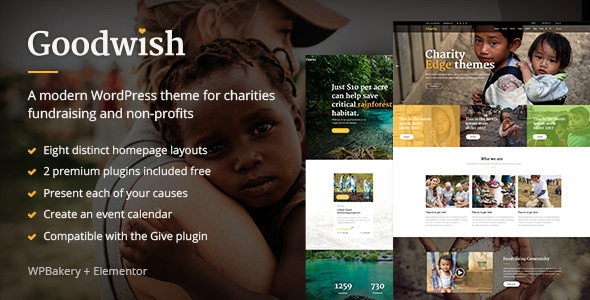
Goodwish – Charity & Nonprofit WordPress Theme
In the digital age, the right online presence is essential for any charity or nonprofit organization aiming to make a real impact. Enter Goodwish, a thoughtfully designed WordPress theme specifically tailored for charities and nonprofits. This theme not only enhances your organization’s visibility but also serves as a powerful tool to connect with donors, volunteers, and the community at large.
What Makes Goodwish a Top Choice?
Goodwish stands out in the crowded market of WordPress themes. Its user-friendly design and dedicated features make it ideal for nonprofits looking to create a compelling online presence with minimal hassle. Here’s why Goodwish deserves your attention:
1. Elegant Design: First impressions matter. Goodwish features a clean, modern layout that allows your content to shine. The elegant design not only attracts attention but also promotes user engagement, helping you convey your mission effectively.
2. Mobile Responsiveness: In a world where more people access websites via smartphones, Goodwish ensures that your site looks stunning on all devices. This responsive design guarantees that visitors have a seamless experience, whether they’re browsing from a computer, tablet, or phone.
3. Customizable Layouts: Each organization is unique, and Goodwish recognizes that. With a variety of pre-designed layouts and customizable options, you can tailor your website to match your brand identity. Showcase your cause with vibrant images and compelling narratives, all without needing to write a single line of code.
Key Features of Goodwish
When it comes to building a nonprofit website, certain functionalities can make all the difference. Goodwish comes loaded with essential features, crafted to help you manage everything from donations to event planning:
– Donation Integration: One of the standout features of Goodwish is its seamless donation system. You can easily set up donation forms, integrate payment gateways, and track contributions. This feature simplifies the fundraising process, allowing donors to contribute with just a few clicks.
– Event Management: Goodwish allows you to organize and manage events effortlessly. Promote upcoming charity events, sell tickets, and keep track of attendees—all from a single platform. This functionality ensures that your supporters stay informed and engaged.
– Blogging Capability: Share stories, updates, and insights through a built-in blogging feature. Regular blog posts help to keep your audience engaged and encourage donations by shedding light on your mission and its impact.
– Social Media Integration: Goodwish makes it easy to connect with your supporters through social media. Share your latest initiatives and engage with your community using integrated social media buttons.
How to Get Started with Goodwish
Ready to elevate your charity’s online presence? Getting started with the Goodwish theme is simple and straightforward. Here’s a step-by-step guide to help you launch your website:
1. Choose a Hosting Provider: Before you can install Goodwish, you need a reliable hosting provider. Look for one that supports WordPress and offers good customer support.
2. Install WordPress: Most hosting providers offer one-click WordPress installation. Follow the prompts to get your content management system up and running.
3. Purchase and Download Goodwish: Once your WordPress site is ready, purchase the Goodwish theme from a verified source. Download the theme files to your computer.
4. Upload the Theme: In your WordPress dashboard, navigate to the Themes section, click Add New, and then Upload Theme. Choose the Goodwish files you downloaded, and hit Install Now.
5. Customize Your Site: Once the theme is installed, you can customize it. Use the theme options to adjust colors, fonts, and features to align with your nonprofit’s branding.
6. Add Content: Start populating your site with engaging content. Make sure to include pages like About Us, Our Mission, and Get Involved, in addition to your donation and event pages.
7. Launch and Promote: After you’ve customized your site and added content, it’s time to go live! Share your new website across social media platforms and through email newsletters to attract visitors.
Conclusion: Transform Your Nonprofit with Goodwish
In a competitive landscape, having the right tools can dramatically impact a nonprofit’s success. The Goodwish WordPress theme offers a blend of aesthetic appeal and functionality, designed specifically for organizations aiming to make a difference. With its intuitive features, customizable layouts, and integrated donation tools, Goodwish empowers charities to craft a compelling online story.
Investing in Goodwish not only enhances your digital presence but also simplifies the process of engaging supporters and donors. Transform your nonprofit’s online strategy today with Goodwish, and take your charitable endeavors to new heights!
Browse more in Wp Themes, including Lighter – Creative Agency & Portfolio WordPress Theme. Official source: WordPress.org themes directory.






Reviews
Clear filtersThere are no reviews yet.