FA Authenticator Plugin for Rise CRM – Compatible with Google, Microsoft, Authy & More
In today’s digital landscape, ensuring robust security for your applications is more critical than ever. Rise CRM recognizes this need and introduces the FA Authenticator Plugin, designed to enhance your experience while providing seamless integration with leading authentication platforms, including Google, Microsoft, Authy, and others. This integration not only boosts security but also offers users a streamlined method to access their CRM.
What is the FA Authenticator Plugin?
The FA Authenticator Plugin is a powerful tool that adds an additional layer of protection to your Rise CRM account. By requiring a second form of authentication, it helps to safeguard your sensitive information from unauthorized access. The plugin integrates effortlessly with popular authentication platforms allowing you to choose your preferred method of two-factor authentication (2FA).
Why Use the FA Authenticator Plugin?
Implementing the FA Authenticator Plugin is more than just a security measure; it’s a commitment to protecting your data. Here are some compelling reasons to consider this plugin:
1. Enhanced Security: The primary benefit of the FA Authenticator Plugin is its ability to provide an extra layer of security. Even if someone gains access to your password, they will still need the second factor to log in, significantly reducing the risk of unauthorized access.
2. User-Friendly Experience: The integration with widely-used platforms like Google and Microsoft makes it easier for users to adapt to the new security measures. This convenience encourages compliance and reduces friction in the user experience.
3. Compatibility with Multiple Platforms: The FA Authenticator Plugin is versatile, supporting various authentication applications like Authy. Users can select their preferred app without being limited to one solution, making it easier to integrate into existing workflows.
4. Flexible Configuration Options: With customizable settings, organizations can tailor the plugin to meet their unique security needs. Whether you prefer SMS, email codes, or app-based tokens, the FA Authenticator Plugin has you covered.
How to Set Up the FA Authenticator Plugin
Setting up the FA Authenticator Plugin for your Rise CRM is a straightforward process. Follow these steps to get started:
1. Install the Plugin: Begin by installing the FA Authenticator Plugin from the Rise CRM marketplace. The installation process is quick and user-friendly.
2. Choose Your Authentication Method: After the installation, navigate to the plugin settings and choose your preferred authentication method. Whether using Google Authenticator, Microsoft Authenticator, or Authy, set it up to suit your needs.
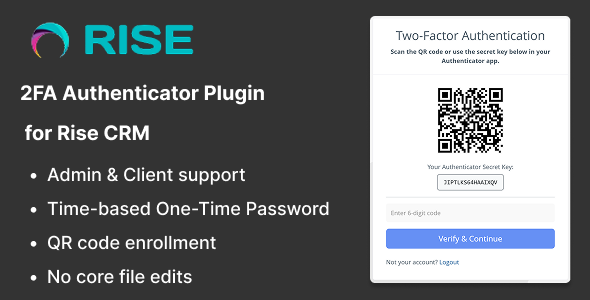
3. Link Your Account: Once you’ve selected your method, link it to your Rise CRM account. This typically involves scanning a QR code or entering a secret key.
4. Complete the Setup: After linking, the plugin will prompt you to complete a test login to ensure everything is functioning correctly. Follow the instructions and confirm that you can access your account seamlessly.
5. Adjust Security Settings: Finally, review and adjust any additional security settings to ensure optimal protection tailored to your organization’s requirements.
FAQs About the FA Authenticator Plugin
– Is the FA Authenticator Plugin Free?
While the plugin may require an initial setup fee, most functionalities are designed to be cost-effective. The value it provides through enhanced security and protection far outweighs the costs.
– Can I use the FA Authenticator Plugin on mobile?
Absolutely! The plugin is designed to work across devices, ensuring you can access your Rise CRM securely from your desktop, tablet, or smartphone.
– What should I do if I lose access to my authentication method?
It’s essential to have backup recovery options set up during the initial configuration. In case you lose access, follow the recovery procedures outlined in the plugin documentation for assistance.
Conclusion
In a world where data breaches are increasingly common, the FA Authenticator Plugin for Rise CRM is an essential tool for securing your business’s sensitive information. Its compatibility with major authentication platforms like Google, Microsoft, and Authy ensures that you not only protect your data but also enjoy a smooth and user-friendly experience. By implementing this plugin, you are not just adopting a security feature; you are taking a significant step toward building trust with your clients and safeguarding your operations. Make the smart move today and enhance your CRM security with the FA Authenticator Plugin.
Browse more in PHP Scripts, including Ready eCommerce – Complete Multi Vendor eCommerce Mobile App, Customer Website with Store POS. Official source: PHP official site.






Reviews
Clear filtersThere are no reviews yet.