
Blog
Elementra – All-in-One 100% Elementor WordPress Theme
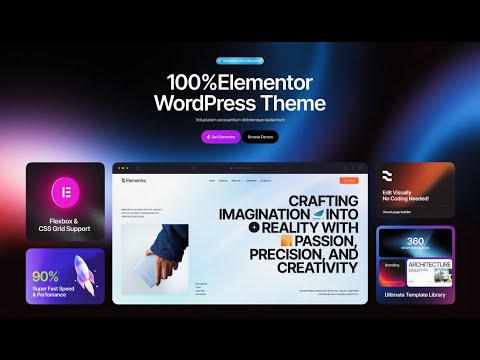
Discovering Elementra: Your Ultimate All-in-One Elementor WordPress Theme
In the ever-evolving world of web design, having a robust theme is crucial for crafting the perfect website. Elementra stands out as a versatile and powerful solution tailored to meet the needs of diverse users. Perfectly designed for professionals and beginners alike, this theme harnesses the capabilities of Elementor, a leading page builder for WordPress. Let’s delve deeper into what makes Elementra an exceptional choice for your next web project.
What is Elementra?
Elementra is an all-encompassing WordPress theme designed exclusively for use with the Elementor page builder. With a focus on versatility, it caters to a wide range of industries, from personal blogs to corporate websites. Its intuitive interface makes it easy to customize every aspect of your site, ensuring a unique online presence without compromising on functionality.
Key Features of Elementra
1. Pre-Built Templates
One of the standout features of Elementra is its extensive collection of pre-built templates. Users can choose from a variety of professionally designed layouts, significantly reducing the time needed to launch a website. Whether you need a landing page, portfolio, or business site, Elementra has a template suited for your needs.
2. Seamless Elementor Integration
Elementra takes full advantage of Elementor’s capabilities, allowing for effortless drag-and-drop editing. This integration means that users can customize their websites in real-time, making adjustments on the spot and visualizing changes as they go.
3. Responsive Design
In today’s mobile-centric world, having a website that looks great on all devices is non-negotiable. Elementra is built with a responsive design principle, ensuring that your site maintains its aesthetic appeal across smartphones, tablets, and desktops. This feature is vital for enhancing user experience and boosting search engine rankings.
4. Extensive Customization Options
Customization is at the heart of Elementra. With unlimited color choices, typography settings, and layout options, users can create a website that truly reflects their brand identity. The easy-to-use customization panel further enhances the process, allowing for a cohesive and polished final result.
5. SEO-Friendly
Elementra is designed with search engine optimization in mind. Its clean coding structure and optimized elements facilitate higher search engine rankings. By using best practices for SEO, such as fast loading times and mobile optimization, Elementra helps ensure that your website gains the visibility it deserves.
Benefits of Using Elementra
Improved User Experience
A well-designed user interface not only captivates visitors but also enhances their overall experience. With clear navigation, responsive design, and fast loading times, Elementra helps retain visitors and leads to higher conversion rates.
Time-Efficiency
With its array of pre-built templates and seamless customization options, Elementra saves users significant time in the web development process. This efficiency allows you to focus more on content creation and marketing, ultimately driving better results for your business.
Regular Updates and Support
Elementra is committed to keeping pace with the latest industry trends and WordPress updates. Regular theme updates ensure that your website remains compatible with new features and security enhancements. Furthermore, dedicated customer support provides assistance whenever you encounter challenges.
Who Should Use Elementra?
Small Business Owners
Small businesses often lack the resources for extensive website development. Elementra offers a cost-effective solution by providing all the necessary tools to create and maintain a professional website efficiently.
Freelancers and Creative Professionals
Freelancers and creative professionals can showcase their portfolios beautifully with Elementra. The extensive design flexibility allows them to present their work effectively, drawing potential clients.
Bloggers and Content Creators
For bloggers and content creators, Elementra’s intuitive setup makes it easy to start sharing your thoughts and ideas. With visually appealing design options, you can enhance your posts and engage your audience.
Non-profits and Educational Institutions
Elementra is also a practical choice for non-profits and educational institutions looking to establish an online presence. Customizable templates perfect for fundraising, event promotion, and information sharing help these organizations reach their goals.
How to Get Started with Elementra
Step 1: Purchase and Install the Theme
Begin by purchasing Elementra from a reputable distributor or marketplace. Follow the installation instructions to set it up on your WordPress site.
Step 2: Choose Your Template
Once installed, browse the extensive collection of pre-built templates. Select one that aligns with your vision and begin the customization process.
Step 3: Customize Your Site
Using Elementor’s drag-and-drop editor, personalize your chosen template. Adjust colors, fonts, and layouts to create a cohesive brand experience.
Step 4: Add Content
Once your design is complete, it’s time to fill your website with engaging content. Use images, videos, and written material that align with your brand message and goals.
Step 5: Optimize for SEO
Utilize Elementra’s built-in SEO features to optimize your site. Ensure that meta descriptions, alt tags for images, and keywords are effectively used throughout your content.
Step 6: Launch and Promote
After thorough testing for responsiveness and functionality, it’s time to launch your site. Promote it across your networks and monitor its performance using analytics tools.
Troubleshooting Common Issues
Compatibility Problems
Sometimes, themes can conflict with certain plugins. To troubleshoot, deactivate all plugins and reactivate them one by one to identify the culprit.
Slow Loading Times
If your site is slow, consider optimizing images and utilizing caching plugins. Elementra is built for speed, but external factors can also affect performance.
Update Notifications
Regular WordPress updates can sometimes lead to notifications from the theme. Simply ensure that you regularly check for updates and apply them as necessary.
Conclusion
Elementra is not just another WordPress theme; it’s a comprehensive solution designed to cater to a wide range of website-building needs. With its seamless integration with Elementor, extensive customization capabilities, and commitment to performance, it empowers users to create stunning, functional websites effortlessly. Whether you’re a small business owner, a freelancer, or a seasoned blogger, Elementra offers the tools and flexibility needed to bring your vision to life. Dive into an enriching experience with Elementra and elevate your online presence today!
