
Blog
Boost Your WordPress AI Chatbot with Pinecone: Install Guide & Why It Beats SQL
Enhance Your WordPress AI Chatbot Using Pinecone: A Comprehensive Installation Guide and Advantages Over SQL
In the evolving landscape of digital communication, the integration of AI-powered chatbots into WordPress sites has emerged as a game-changer. These chatbots enhance user experience by providing instant assistance and answering queries efficiently. One standout solution for developing these chatbots is Pinecone, a vector database that offers significant advantages over traditional SQL databases. This guide will walk you through the installation process of Pinecone and explain why it is the superior choice for your WordPress AI chatbot.
Understanding the Role of AI Chatbots in WordPress
AI chatbots are automated systems that interact with users through text or voice. They can answer questions, provide personalized recommendations, and assist with various tasks in real time. Integrating an AI chatbot into your WordPress site can lead to improved user engagement, reduced response times, and heightened customer satisfaction.
Why Choose Pinecone for Your Chatbot?
Pinecone functions as a vector database designed to manage and retrieve high-dimensional data efficiently. Unlike traditional SQL databases that handle structured data, Pinecone excels in working with unstructured data often found in AI applications.
Key Benefits of Pinecone
-
Scalability: Pinecone is built to process large amounts of unstructured data seamlessly. As your chatbot grows and your data requirements increase, Pinecone can scale up effortlessly.
-
Speed and Performance: With its advanced indexing algorithms, Pinecone allows for rapid searches, ensuring that your chatbot can deliver quick responses, enhancing user experience.
-
User-Friendly Integration: Pinecone is designed for seamless integration with existing systems, making it an excellent choice for WordPress developers.
- Cost-Effectiveness: By optimizing data storage and retrieval, Pinecone helps reduce costs associated with data management.
Step-by-Step Installation Guide for Pinecone on WordPress
Installing Pinecone to power your AI chatbot involves a series of straightforward steps. Here’s how to set it up:
Step 1: Prerequisites
Before installation, ensure you have the following:
- A WordPress site up and running
- Access to the WordPress admin dashboard
- Basic familiarity with coding (especially if you plan to customize your bot)
Step 2: Create a Pinecone Account
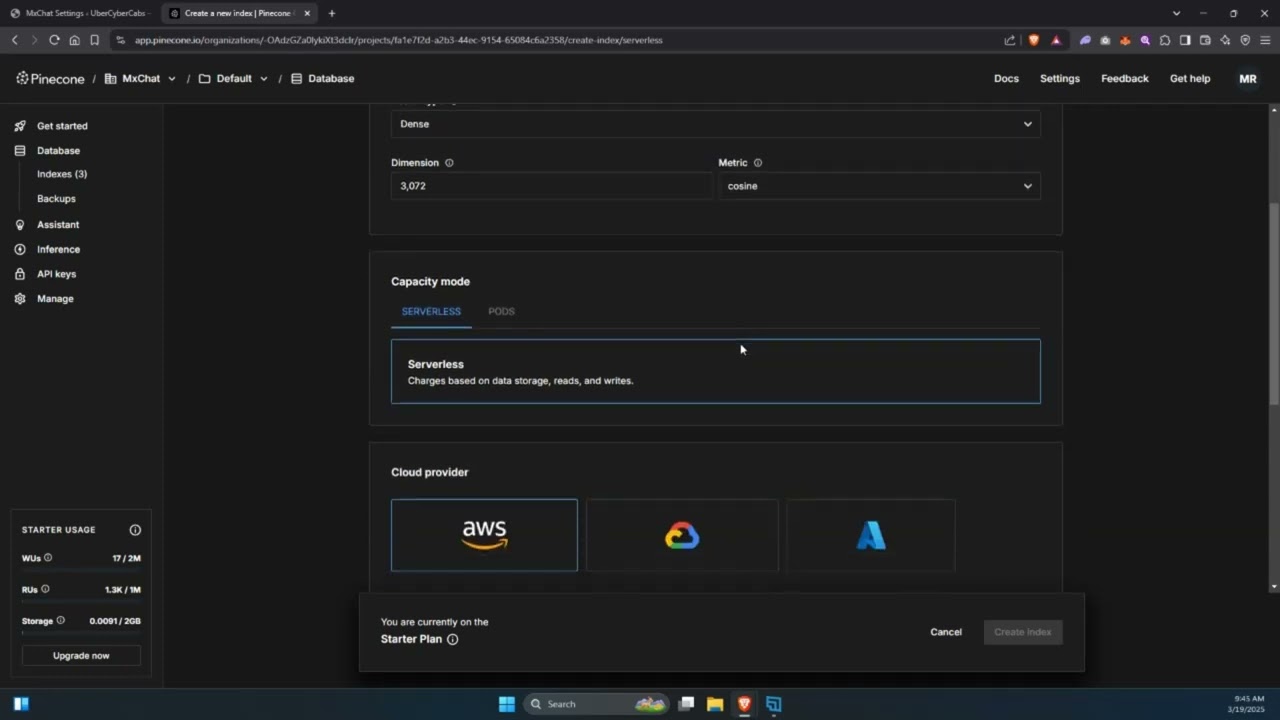
- Visit the Pinecone website and sign up for a free account.
- Once registered, log in to your Pinecone dashboard to create your first project.
Step 3: Collect API Keys
To integrate Pinecone with your WordPress site, you’ll need API keys:
- Navigate to the API section in your Pinecone dashboard.
- Generate a new API key. Make sure to save this key securely, as you will use it in your WordPress configuration.
Step 4: Install the Pinecone Plugin
- Log in to your WordPress admin dashboard.
- Go to Plugins > Add New.
- Search for "Pinecone" in the plugin repository.
- Click Install Now, then activate the plugin once installed.
Step 5: Configure the Plugin
- After activation, navigate to the Pinecone plugin settings within your dashboard.
- Enter your Pinecone API key and other relevant configuration details.
- Customize the settings to tailor the chatbot’s functionality to fit your business needs.
Integrating Pinecone with Your Chatbot
Once you have Pinecone installed, the next step is integrating it with your chatbot:
1. Select a Chatbot Framework
Choose a chatbot framework that suits your needs. Some popular choices include:
- Dialogflow
- Botpress
- Rasa
Make sure your chosen framework is compatible with Pinecone.
2. Set Up Data Management
Utilize Pinecone’s capabilities to manage your chatbot’s dataset efficiently:
- Data Input: Import your existing user data for personalized interactions.
- Indexing: Use Pinecone’s indexing tools to optimize data retrieval.
- Querying: Implement advanced querying capabilities to enhance your chatbot’s performance.
Advantages Over SQL Databases
While SQL databases have served many applications well, they fall short when handling the complexities of modern AI chatbots. Here’s how Pinecone outshines them:
1. Handling Unstructured Data
- SQL: Primarily manages structured data, making it challenging to work with the diverse formats of chatbot inputs.
- Pinecone: Excels in managing unstructured data, enabling your chatbot to understand and respond to a wider range of user queries.
2. Enhanced Retrieval Speed
- SQL: Can experience latency issues, especially with larger datasets.
- Pinecone: With its vector-based architecture, it retrieves data significantly faster, allowing your chatbot to provide real-time responses.
3. Simplicity in Scaling
- SQL: Scaling can be problematic; as data grows, additional configurations often complicate management.
- Pinecone: Designed to scale seamlessly, ensuring your chatbot performs optimally regardless of data growth.
Best Practices for Managing Your AI Chatbot
Once you’ve set up your Pinecone-powered AI chatbot, following best practices can enhance performance:
Regular Updates
Keep your chatbot updated with the latest information and functionalities. Regularly revisiting the Pinecone configuration can ensure optimal performance.
User Feedback
Implement mechanisms to gather user feedback on chatbot interactions. This data can illuminate areas for improvement and help refine the chatbot’s responses over time.
Performance Monitoring
Use analytics tools to monitor your chatbot’s performance. Regular tracking of key metrics—such as user engagement and response times—will help you make data-driven decisions for enhancements.
Conclusion
Integrating Pinecone with your WordPress AI chatbot can significantly elevate user engagement and satisfaction. With its advanced data handling, speed, and scalability, Pinecone stands out as a superior alternative to traditional SQL databases. Follow this comprehensive installation guide, leverage Pinecone’s capabilities, and take your WordPress chatbot to new heights. By adopting best practices and regularly refining your chatbot, you can create an invaluable resource that not only meets but exceeds user expectations.
